![sendify-helpcenter-logo-white-2.svg]](https://help.sendify.com/hubfs/sendify-helpcenter-logo-white-2.svg)
You can now ask questions about your shipments directly in your Sendify account. Start a support case from the shipment, and your question is automatically linked to the right booking. You can then follow the case and chat with customer service there.
Has your goods arrived damaged, or has a shipment gone missing? Then you start a claim or a search case in the same way. Read more in How to start and follow a claim or a search errand.
Watch the video below to see how a case works.
What can I get help with?
Start a support case when you have a question about a shipment, for example:
- Pickup problems: the driver hasn't arrived, or you need to make an adjustment.
- Delivery questions: the shipment is delayed, or you have questions about the delivery time.
- Change of address: you need to change the address of a shipment that has already been picked up.
- Other: anything else we can help you with.
(More options coming soon...)
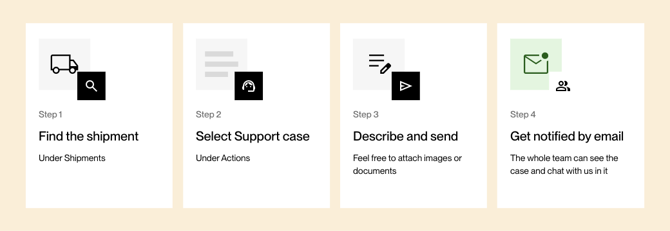
Follow your case
You'll find all your cases under Support in the left-hand menu. There you can see the status and the full history, and you can chat with customer service directly in the case.
You get an email when something happens
As soon as we've replied or the case has been updated, you get a notification by email. Click the link in the email to go straight to the case. You can't reply to the notification email; go into Sendify to reply in the case.
You can also see directly in your account if there's a new update in any of your cases.
Why a support case is the best way to get help
With all your cases in one place, you don't have to repeat yourself across chat, email and phone, or explain the case to a colleague before you go on holiday.
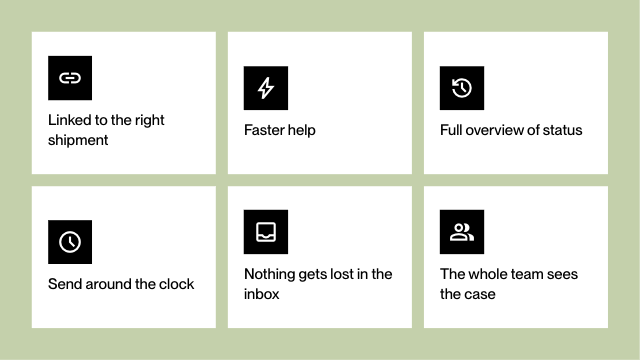
- Linked to the right shipment: you don't need to look up booking numbers or other details. We can see straight away which shipment it's about.
- Faster help: we get the right information from the start, so there's less back and forth.
- Full overview of status: you can see where the case stands and its full history whenever you like.
- Send it when it suits you: you can start a case around the clock, even when chat and phone are closed.
- Nothing gets lost in the inbox: the whole conversation stays in the case instead of ending up in an email thread that's hard to find.
- The whole team can see the case: everyone on your account sees the same cases. If a colleague is off or leaves, someone else can take over right away.
How to start a case
- Go to Shipments and find the shipment in question.
- Click Options and select Support case.
- Choose the option that fits best, describe the issue and submit.
The case is automatically linked to the right shipment, so you don't need to enter a booking number or other shipment information.
Frequently asked questions
Can I still chat or call?
Yes. If your question is about a specific shipment, a support case started directly from your account is usually best. That way we have all the information straight away and can help you faster and more easily.
Who in our company can see the cases?
All users on your account see the same cases in a shared view, so no one needs to ask who replied what or what has happened.
How long does it take to get a reply?
You'll always get a reply from us in your case within 1 hour. Handling of the case itself may also depend on the carrier's procedures.
I can't find the shipment in the list. What should I do?
If you can't find the shipment, contact us via chat and we'll help you.
I have a question that isn't about a shipment.
Contact us via chat or phone and we'll help you.