![sendify-helpcenter-logo-white-2.svg]](https://help.sendify.com/hubfs/sendify-helpcenter-logo-white-2.svg)
Available on plus- & pro price plans
How to get started
Log in to Sendify and go to "Own Agreements" in the menu, select UPS and click "Add" and follow the instructions.How to find your details on your UPS contract
1) You need to create an application on UPS developer portal, follow this guide to set it up and ensure to add the products mentioned in step 2. If you already have an application - go to step 2.
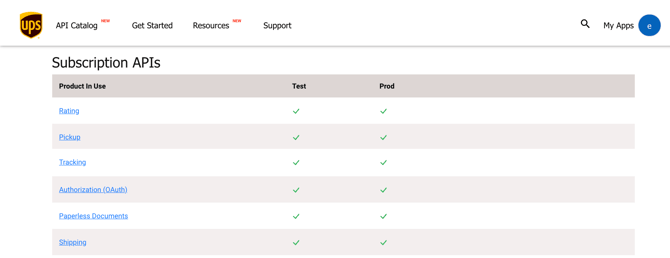
2a) Ensure that you have the correct products enabled for you application, you need to have: Shipping, Pickup, Tracking, Rating, Authorization (OAuth) and Paperless Documents
2b) If you are missing any of the products click "Edit App" to add them
3) Obtain your credentials in your app by navigating to "My Apps" > Click on your app and you find the Client ID and Client Secret can be found under App Info/Credentials

Customs? Make sure to enable UPS Paperless Invoice
To be able to send shipments that requires customs we are using UPS Paperless to transfer the customs documents to UPS, this requires your account to be configured to have UPS Paperless. Follow this guide and ensure that you have "Paperless Documents" as a product in your app (see step 2 above).
Done! You can now go in and book on your own agreement with UPS